

AI TELEPROMPTER FOR IPHONE, IPAD & MAC
Look up and speak.
Look down, and your next line is still there.
For presentations, work updates, and videos. Prepare your script, follow your speaking pace, and keep your next line in view. On iPhone and iPad — and now in preview on Mac.


For iPhone and iPad · iOS 18 or later · No subscriptions
Meet Oralo for Mac ↓Scan QR code or copy link ↓ See how voice following worksA little closer
to the camera.
Your meeting on screen. Your next line near the lens. Bring Oralo’s voice following and reading hints to a native Mac workspace, with a floating prompt that fits around your call.
Get the preview on GitHubmacOS 15+ Apple silicon + Intel
Prepare with room to think.
Create, import and edit scripts. Add pinyin or IPA, listen to a word, then start speaking.
Make the window your own.
Place it near the camera or in a corner. Adjust its size, background transparency, line spacing and highlight color. Your preferences stay saved.
Speak at your pace.
Let voice following guide your next line, pause for a thought, and find your place after going off script. Your scripts stay on your Mac.
Share the presentation. Keep your prompt close.
In your meeting or casting app, share only the PPT or browser window you want others to see. Check the audience preview; sharing the whole desktop can include your prompt.
An early test preview, not yet notarized by Apple. macOS may block the first launch; installation steps and release notes are on GitHub.
From first draft.
To your next talk.
Prepare your words, find your flow, and give it another go. See how Oralo brings it all together.
A home for your words.
Create, paste, or import a plain-text script. Your edits save on your device, ready for your next session.
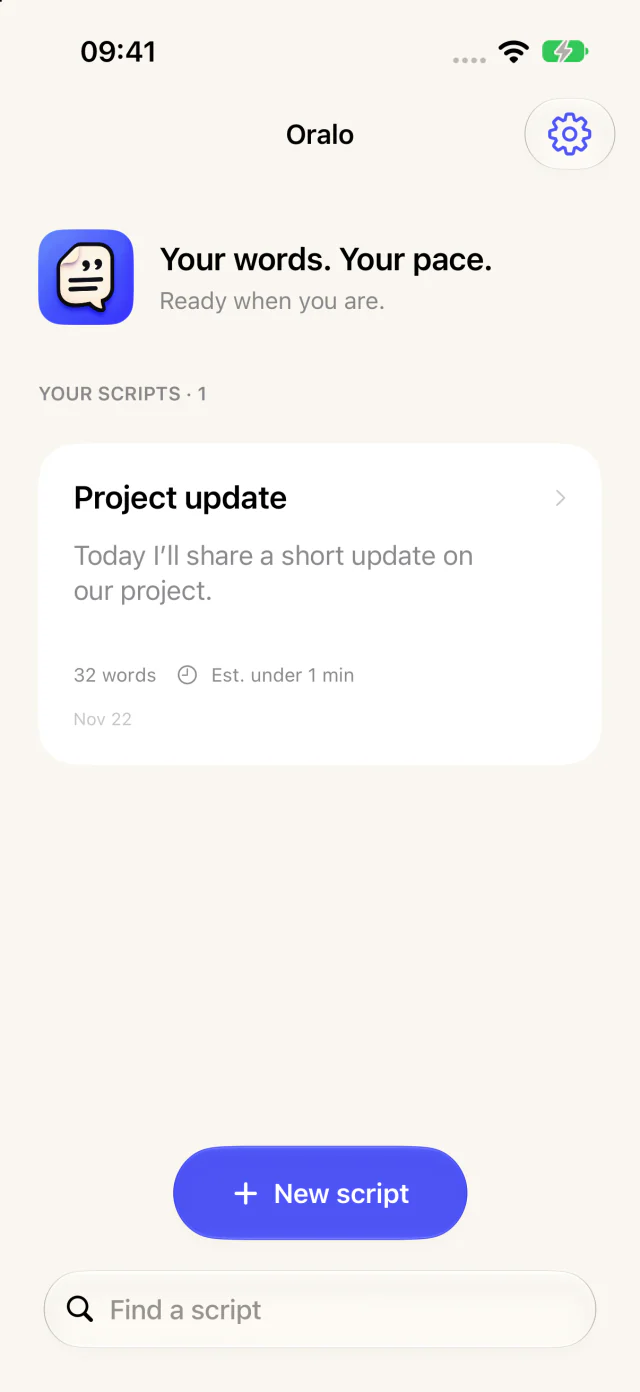
Get a feel for the timing.
See your word count and estimated speaking time. Adjust the estimate to your pace, then refine your phrasing and pauses.
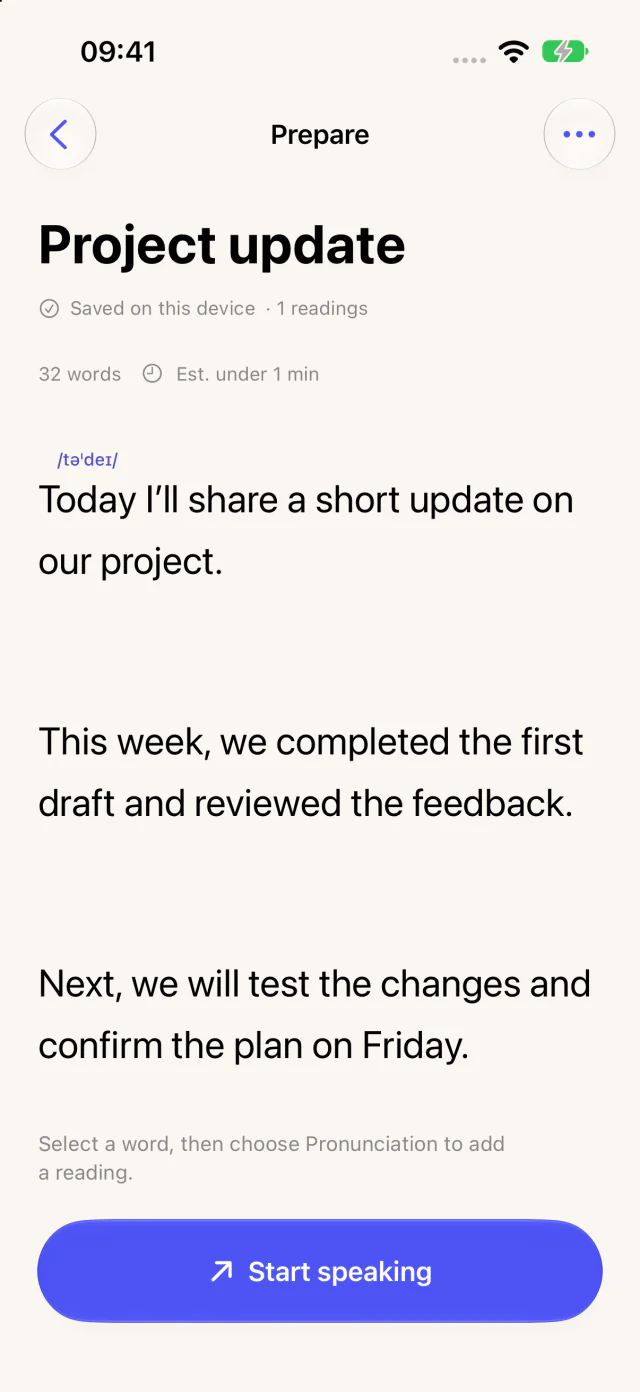
Make the next take yours.
Revisit a passage after rehearsal and choose words to check. Save a pronunciation hint, then rehearse again.
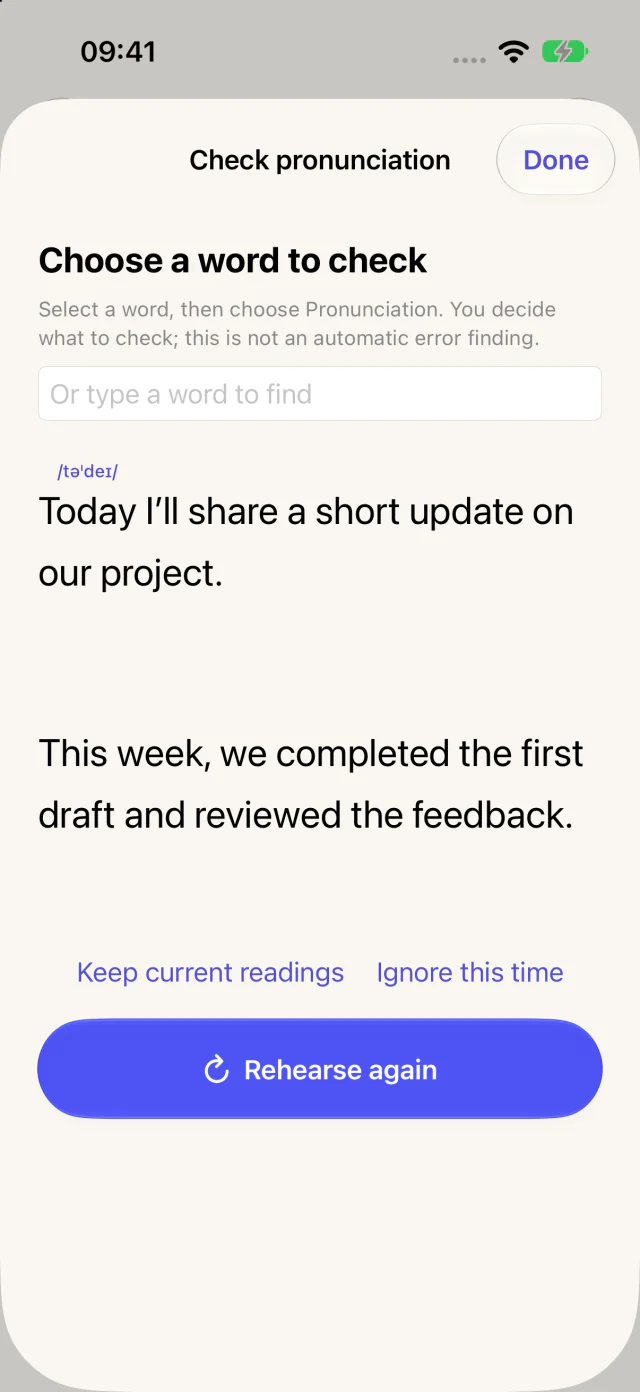
Native Oralo 1.0 (14) screenshots · iPhone 17 simulator, iOS 27.0 · English Project update sample · 22 Nov 2026.
Online tool: Estimate speech length ↗Online tool: Listen to your script ↗Online tool: Microphone test ↗Online tool: Webcam test ↗
You speak. It follows.
You speak. It follows. On-device speech recognition matches your current script and marks where you are. Pause, and it waits; keep going, and it stays with you. When you return, it may try to pick up the same sentence or a nearby later line if it clearly recognizes the original wording. You can also choose a line yourself, and your choice takes priority. Results vary with the room, device, and language, and are still being refined in real use.
How voice following worksThis interactive example uses no microphone. Use voice following in the app with a supported on-device speech model.
This quarter, we made real progress.
Make what matters
clearer for everyone.
Next, make every delivery more reliable.
Read the numbers precisely. Tell the stories your own way.
Go off script.
Find a way back.
An unexpected story. A point worth explaining. When nearby wording is clearly recognized, Oralo can try to pick up your place. You can also choose a line yourself.
Find a nearby line
When nearby script content is clearly recognized, Oralo looks for your place. Manual cue selection is always available.
Or choose the next line yourself
Open the recovery controls and choose a sentence. Your place stays paused until you tap Resume.
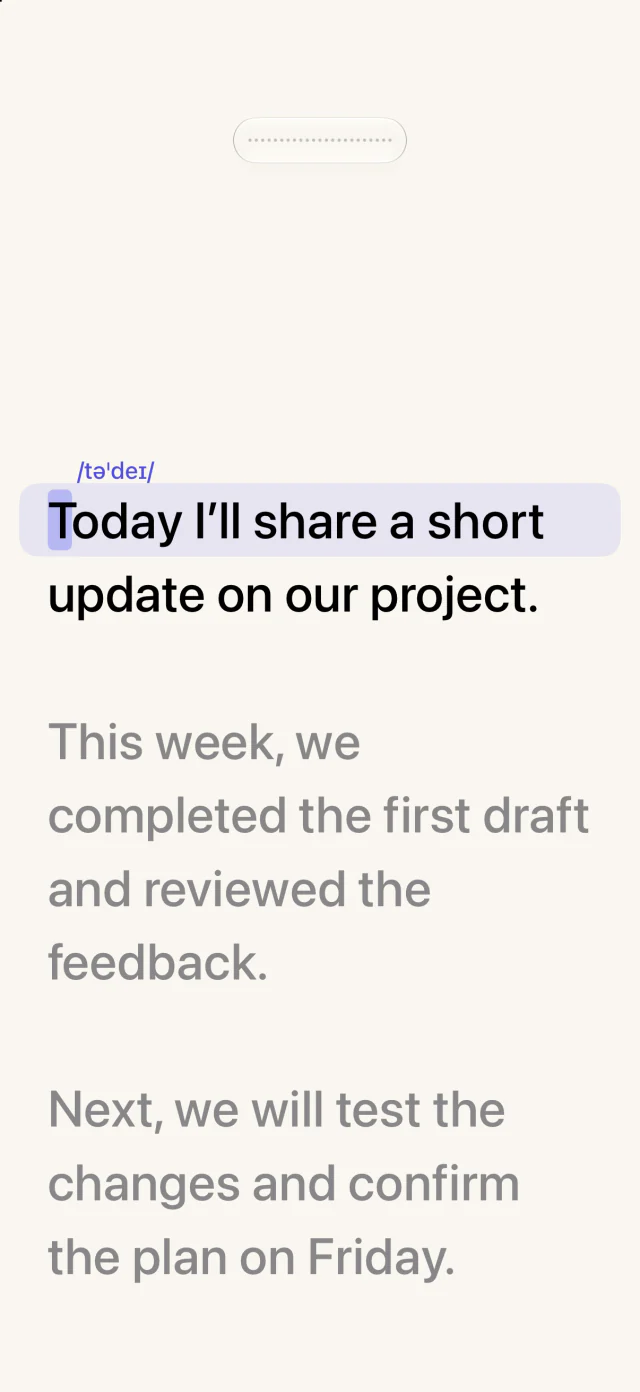
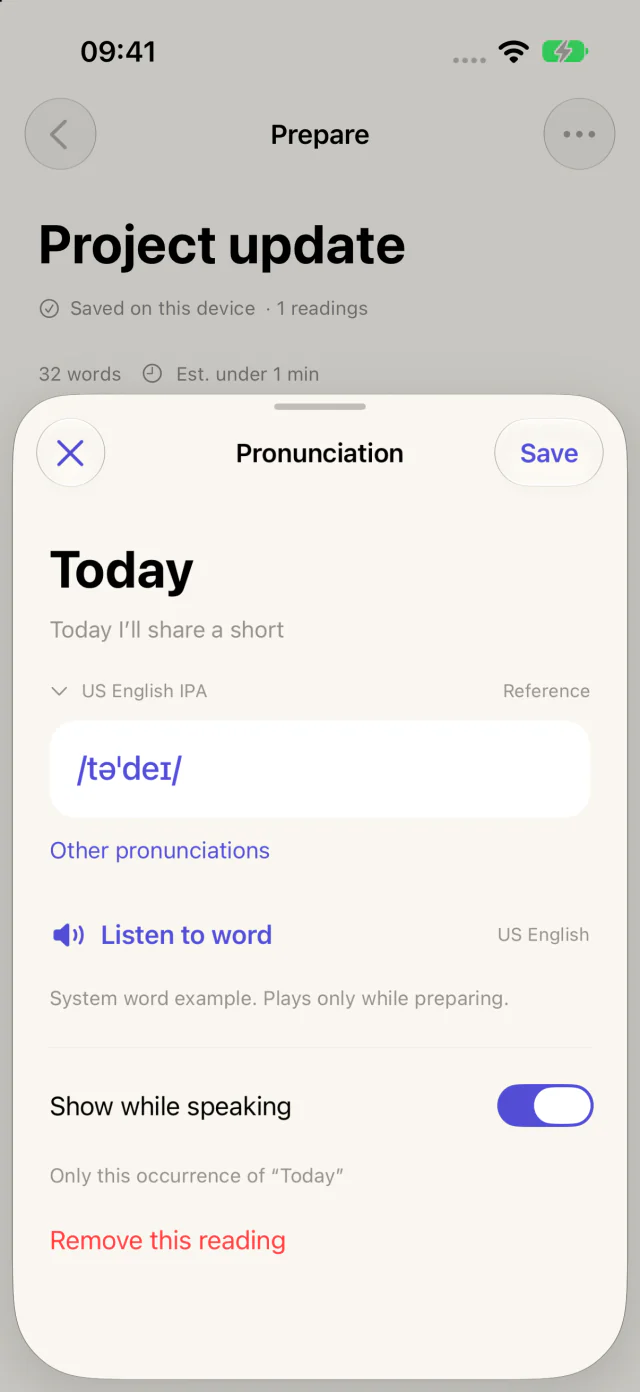
New words.
Same confidence.
Select a Chinese or English word while preparing. Add, check, and save its pinyin or IPA, then keep that hint above the word while you speak.
The app offers reference word playback while preparing and silent reading hints while presenting. Try a browser voice example below.
Hear it while preparing. Glance at it while presenting.
Switch apps.
Keep your place.
Keep your script in a Picture-in-Picture window while switching apps. Choose fixed-pace scrolling or start voice following in Oralo first. Follow the setup guide and check the tested scope before your first recording.
How the floating prompt worksSet a pace. Take a breath.
Choose your scrolling speed and start after a 3-second countdown. Fixed pace uses no microphone.
Speak, and the window follows.
Start voice following in Oralo before switching apps. If microphone input is interrupted, your place is held. Return to Oralo to restart, or use fixed pace.
Your reading hints come too.
Saved pinyin and IPA stay above their words. Adjust the text size, and return to Oralo to pause.
System Camera photo preview was checked on iPhone 15 Pro / iOS 18.1. Recording-time following was separately confirmed in user feedback without a complete device/app list. See the guide for the tested scope.

A little camera confidence.
Take a breath. Be yourself.
Talk to one person, not a lens.
Eyes on the lens.
Words in view.
Turn on Mirror text in Oralo and place your device on a teleprompter tray. The glass reflects the reversed script into readable words, close to the camera lens.
Your words and hints flip together.
Mirror the script, pinyin, IPA, and highlighting. Your controls stay the right way round.
Change the view. Keep your place.
Switch mirroring on or off, or rotate your device, while keeping your reading position and pause state.
For use with a separate teleprompter rig.
A silent native Oralo screen recording shows Mirror text being switched on and off for the English Project update sample. The script, its IPA hint and highlight reverse while controls remain readable. Captured on an iPhone 17 simulator running iOS 27.0.
The video could not play. Please use the Open video link.
A little more room.
The same flow.
Keep your library and draft side by side on iPad, then go full screen to speak. Choose the orientation, text size, and appearance that feel right for you.
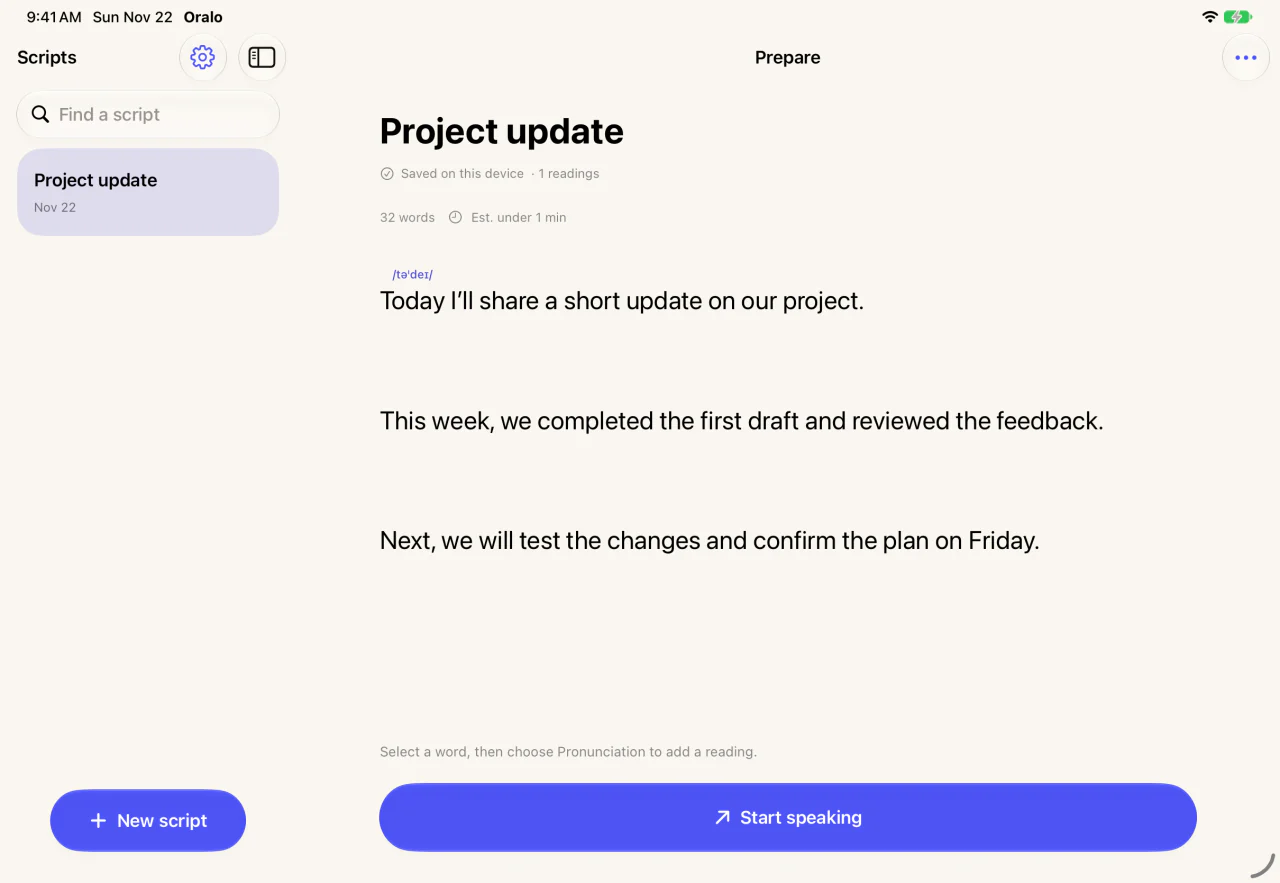
Portrait or landscape
Rotate while keeping your place and pause state. Adjust text size and choose a light or dark reading view.
Ready for a teleprompter mirror
Mirror the script, hints, and highlighting for your teleprompter hardware. Controls stay easy to read.
Your scripts stay with you
Scripts, reading hints, and rehearsal records save locally. The app does not upload your scripts or microphone audio to our servers.
Your words deserve to be heard.
Work updates
Clear numbers. Clear takeaways.
Live talks
Eyes up. Your next line waiting.
Meetings
Room for thoughts. A little structure.
A few things to know.
Where can I download Oralo?
Oralo is available on the App Store for iPhone and iPad. One download includes all features, with no subscriptions or in-app purchases. See the App Store for the current price in your region.
How does voice following work?
Oralo matches on-device speech recognition to your script and highlights your place as you speak. It waits during pauses. If it clearly recognizes original wording, it may try to return to the same sentence or a nearby later line. You can also select a line yourself; your choice takes priority. Performance depends on your environment, device, and language.
Can I automatically return after going off script?
Oralo can look for the same sentence or nearby lines when it clearly recognizes the original wording. It does not promise accurate jumps across the whole script. Noise, distance, and other voices can affect recognition. You can select a line yourself whenever you need to.
Which devices and languages are supported?
Oralo supports iPhone and iPad on iOS / iPadOS 18 or later. A separate Mac test preview is available for macOS 15 or later, on Apple silicon and Intel. The iOS interface supports English, Simplified Chinese and Traditional Chinese; the Mac preview supports English and Simplified Chinese. Both include Chinese pinyin and English IPA hints. Voice following needs a supported device, language and installed system speech model.
What can I revisit after a rehearsal?
You can review duration, pauses, returns to the script, and supported quiet or repeated-passage cues, then revisit the original line, edit your draft, or check a word. These are review aids, not a speaking score or an automatic pronunciation assessment.
Can I use Oralo offline?
Script editing and reading use local data. Voice following needs a supported system speech model already downloaded to your device; the first download of a model or voice may require the internet. When on-device recognition is unavailable, manual reading remains available, and the app will not send audio to a cloud recognizer instead.
Can I use the floating prompt with Camera or a call?
Open your script → (…) → Floating prompt. Fixed pace needs no microphone; voice following starts inside Oralo. Camera photo preview was checked on iPhone 15 Pro / iOS 18.1. Separate feedback confirmed following during recording and normal recorded speech, without a complete device/app list. Other recording, livestream and calling apps need a check on your own setup.
About Oralo
Oralo is a native iPhone and iPad teleprompter for presentations, work updates and spoken videos.
Voice following uses on-device speech recognition and needs a supported system language model. The first model download may require internet access.
- System requirements
- iOS 18.0 or later · iPadOS 18.0 or later
- Category
- Productivity
- Developer
- 立文 陈
Your words. Your pace.
Ready when you are.
Bring your script, add reading hints, and start speaking. Choose the App Store app for iPhone and iPad, or try the Mac preview.
For iPhone and iPad · iOS 18 or later · No subscriptions
macOS 15+ · Apple silicon + Intel · Test preview

Take Oralo to your iPhone or iPad
Scan with your camera to open the App Store.
This shares only the download link, not your script.